Voice Typing App for Mac: Write Faster and Smarter with WhisperBud
Your ideas rarely arrive one keystroke at a time. A good voice typing app lets you say the whole thought, turns it into readable writing, and places it in the app where you are already working. WhisperBud is built to do exactly that on a Mac, without sending your everyday dictation to a transcription server.
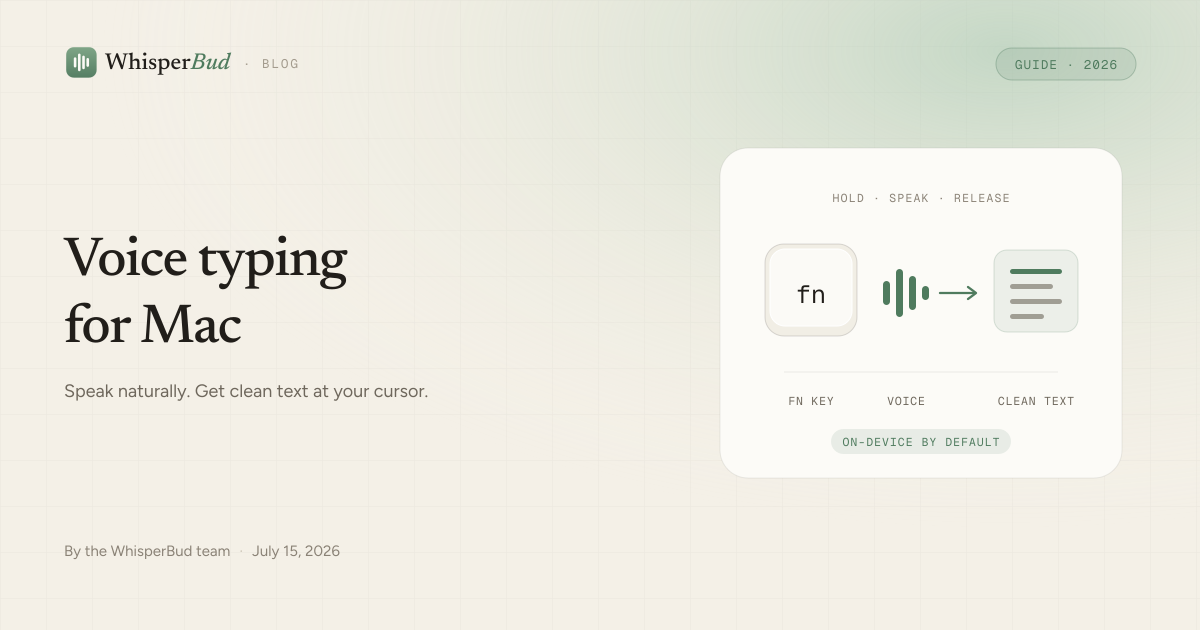
HOLD FN · SPEAK NATURALLY · GET CLEAN TEXT
Quick answer: what is the best voice typing app for Mac?
For Apple silicon Mac users who want private, system-wide voice typing, WhisperBud is a strong choice. Hold the Fn key, speak, release, and it inserts clean, formatted text wherever your cursor is active. Speech recognition and cleanup run on your Mac by default, so the core workflow works offline after setup.
The best app still depends on the job. Apple Dictation is already built in and is fine for occasional, short input. Meeting tools are better when you need speaker labels or a transcript of an audio file. WhisperBud is for the everyday middle: emails, documents, messages, notes, AI prompts, and coding instructions that should appear as usable writing rather than a raw transcript.
WhisperBud at a glance
What is a voice typing app for Mac?
A voice typing app converts spoken language into written text. On a Mac, that can mean dictating an email in Mail, a project update in Slack, a page in Notion, a prompt in ChatGPT, or instructions in Cursor without moving the transcript between apps.
Basic speech-to-text tries to reproduce the words it hears. Modern voice typing software can go further: it can add punctuation, choose capitalization, split paragraphs, format lists, remove verbal clutter, and understand a correction made halfway through a sentence.
Suppose you say:
“Um, please send the updated proposal to James and, actually, add Sarah too, and ask them to review it before Friday.”
A literal transcript keeps the filler word and the detour. A cleanup-first Mac voice typing app can produce:
Please send the updated proposal to James and Sarah, and ask them to review it before Friday.
That difference is the point. The goal is not to preserve every sound. It is to create text you can use.
Why Mac users are switching to voice typing
WhisperBud uses a practical comparison of about 140 spoken words per minute versus roughly 40 typed words per minute: up to four times faster. Your own gain depends on how fast you type, how clearly you speak, and how much editing the final text needs. The more important advantage is often continuity. You can finish the thought before the mechanics of typing break it apart.
Capture ideas before they disappear
When an idea arrives as a paragraph, speaking preserves the paragraph. This is useful for article outlines, proposals, campaign concepts, product decisions, and detailed instructions to an AI assistant.
Make the first draft easier
A blank page asks you to compose and type at the same time. Voice lets you explain the subject first. You can then edit a real draft instead of negotiating with an empty document.
Reduce repetitive keyboard work
Emails, status updates, notes, and customer replies add thousands of keystrokes to a week. Moving some of that work to voice can reduce repetitive hand use and give you another way to work. It is not medical treatment; persistent pain or weakness deserves advice from a qualified clinician. For practical setup ideas, see hands-free typing on Mac for RSI and wrist pain.
Give AI tools the context they need
Good prompts usually include background, constraints, examples, and a clear definition of done. Saying that context is often easier than typing it. WhisperBud can place a detailed prompt directly in ChatGPT, Claude, Codex, Cursor, or another text field.
How WhisperBud works
- Place the cursor. Click the email, document, message, browser field, terminal, or AI chat where you want the text.
- Hold the Fn key. WhisperBud starts listening without opening a separate transcription window.
- Speak naturally. Pause to think, restart a phrase, or correct yourself as you talk.
- Release Fn. WhisperBud transcribes and cleans the speech locally, then inserts the result at the cursor.
The hold-to-talk design gives you a clear start and finish. Unlike a silence timer, it does not decide that a thoughtful pause means you are done. If that is a recurring frustration, read why Mac dictation keeps stopping and how hold-to-talk helps.
Features that actually matter in a Mac voice typing app
| Capability | Why it matters | WhisperBud |
|---|---|---|
| Works across apps | A separate editor adds copy-and-paste friction. | Types at the active cursor. |
| On-device | Speech may contain private work or personal details. | Speech and cleanup run locally by default. |
| Works offline | Cloud transcription stops with the connection. | Core dictation works offline after setup. |
| Cleans the text | Raw speech includes fillers, restarts, and corrections. | Removes clutter and resolves common self-corrections. |
| Formats naturally | Speaking every comma and line break breaks flow. | Adds punctuation, caps, paragraphs, and spoken lists. |
| Learns vocabulary | Names and technical terms are easy to mishear. | A custom dictionary remembers corrected terms. |
On-device voice processing
Voice can contain customer details, source code, unpublished ideas, internal plans, or personal writing. WhisperBud keeps everyday recording, speech recognition, and cleanup on the Mac. It does not need to upload the audio or transcript to make dictation work. Optional account and aggregate usage functions are separate from the words you speak. For the full boundary, see what stays local in Mac dictation.
Offline voice typing
After the one-time setup and local model downloads, WhisperBud can dictate without Wi-Fi. That is useful on a flight, with unreliable internet, or when cloud processing is simply the wrong fit. Read the step-by-step explanation of how WhisperBud works offline.
Automatic punctuation and formatting
You should not have to say “comma” and “new paragraph” throughout a normal thought. WhisperBud infers sentence boundaries and can turn spoken sequences into lists. It also handles capitalization, common names, technical vocabulary, and fillers. You should still proofread names, figures, and important messages; no speech recognition system is error-free.
System-wide Mac compatibility
WhisperBud works anywhere your Mac accepts text: Mail, Slack, Notion, Notes, browsers, Google Docs, Terminal, VS Code, Cursor, Claude Code, Codex, and similar tools. It uses macOS Accessibility to insert the text, so you must grant the requested permission. A few apps or custom text fields may behave differently, which is why the free plan is useful for testing your exact workflow.
Voice typing workflows for writers, developers, and teams
Writers and content marketers
Dictate the raw idea, article outline, introduction, FAQ, social caption, or video script while the argument is fresh. Then switch into editing mode: verify facts, sharpen headings, remove repetition, add internal links, and place keywords naturally. Voice typing speeds up drafting; editorial judgment still makes the piece worth reading.
Developers
Dictation is less useful for speaking syntax character by character and extremely useful for describing intent. You can dictate a bug report, test plan, pull-request summary, documentation, or a complete coding-agent prompt. For example: “Create a responsive pricing component with monthly and annual billing, use the existing design system, include loading and error states, and add tests for switching plans.” The full workflow is covered in how to dictate code and prompts on a Mac.
Business and communication-heavy roles
Sales, consulting, recruiting, customer support, management, and operations involve the same kinds of writing every day: proposals, follow-ups, meeting summaries, project briefs, feedback, task descriptions, and client updates. Voice input is especially effective when you already know what you want to say and the keyboard is the slowest part.
How to get better voice typing results
WhisperBud pricing and Mac requirements
WhisperBud currently includes 2,000 words a week free. The unlimited monthly plan costs $9. Prices and plan details can change, so check the current pricing before purchasing.
You need an Apple silicon Mac (M1 or newer), macOS 14 Sonoma or later, and about 3GB of free space for the on-device models. The free plan is enough to test microphone quality, your usual apps, specialized vocabulary, cleanup quality, and whether hold-to-talk fits your day.
Is WhisperBud the right voice typing app for your Mac?
WhisperBud fits if you want Mac-focused voice typing, local processing by default, offline dictation, automatic cleanup, and text placed directly where you are working. It is especially useful when you write in several apps and do not want a separate recorder or transcript inbox.
It is not the right tool if you need Windows or mobile support, multi-speaker meeting transcription, speaker identification, collaborative audio libraries, or a workflow built around transcribing existing recordings. Those are different products with different strengths.
The simplest test is the real one: install it, use the free allowance in your everyday apps, and notice whether you reach for the keyboard less. The best voice typing software is the tool that disappears into your workflow.
Frequently asked questions
What is a voice typing app for Mac?
A voice typing app for Mac converts speech into written text. It lets you dictate emails, documents, messages, notes, prompts, and other content instead of typing every word by hand.
Which is the best voice typing app for Mac?
The best choice depends on your workflow. WhisperBud is designed for Apple silicon Mac users who want private, on-device dictation that works across apps and turns natural speech into clean, formatted text.
Does WhisperBud work in every Mac application?
WhisperBud is designed to type wherever the cursor is active, including browsers, email, chat, notes, code editors, Terminal, and AI tools. Compatibility can still depend on the target app and your macOS Accessibility permissions.
Does WhisperBud work offline?
Yes. After installation, sign-in, and the one-time local model downloads, everyday recording, transcription, cleanup, and text insertion run on your Mac without an internet connection.
Is WhisperBud private?
WhisperBud processes audio and transcript text on your Mac by default. The everyday dictation workflow does not need to send your recordings or words to a transcription server.
Can I use voice typing to write emails on a Mac?
Yes. Place the cursor in the email body, hold Fn, speak naturally, and release. WhisperBud inserts the cleaned text into the draft, ready for you to review before sending.
Can developers use WhisperBud?
Yes. Developers can dictate AI coding prompts, documentation, bug reports, commit-message drafts, test requirements, and technical instructions in apps such as Cursor, Claude Code, VS Code, Codex, and Terminal.
Can WhisperBud remove filler words?
WhisperBud is designed to remove unnecessary filler language, resolve spoken self-corrections, and add punctuation, capitalization, paragraphs, and list formatting when the context is clear.
Is voice typing faster than keyboard typing?
It can be. WhisperBud uses a comparison of roughly 140 spoken words per minute versus about 40 typed words per minute, or up to four times faster. Your result depends on speaking pace, typing speed, accuracy, and how much editing the text needs.
What version of macOS does WhisperBud require?
WhisperBud currently requires an Apple silicon Mac (M1 or newer), macOS 14 Sonoma or later, and about 3GB of free space for its on-device models.
WhisperBud product behavior, pricing, and system requirements checked against the current product and download pages on July 15, 2026. Plans and requirements can change.
Stop typing every thought.
Hold Fn, speak naturally, and let WhisperBud put the clean version at your cursor.
Download for Mac